The primary goal of exoatlas is to create populations of exoplanets which which we can interact in fairly standardized way. Here we summarize a few different pre-defined Population objects we can create. From all these basic populations, you can make your own to play with by indexing, slicing, or masking as described in Populations.
import exoatlas as ea
import exoatlas.visualizations as vi
import astropy.units as u

ea.version()'1.0.0'Throughout this page we’ll use a handy PlanetGallery() gallery visualization to see some basic properties of a particular population. For more on useful plots and plotting tools, see Visualizing.
Predefined Archival Datasets
The atlas contains a few predefined populations, for which data are automatically downloaded from archives and standardized into tables in exoatlas’s preferred format. This downloading and standardizing can take a while, so the results will be stored locally, in a directory you can locate with:
ea.locate_local_data()💾 `exoatlas` archive data will be stored in:
/Users/zabe0091/exoatlas-data
By default, downloaded data will be stored inside your current working directory. If you’ll be using exoatlas from lots of different directories on your computer, and you don’t want to keep downloading fresh copies of the archive into each working directory, you can define one path that should be used for exoatlas data for your entire computer by setting a global EXOATLAS_DATA environment. For example, on a mid-2020s Mac, this looks like editing the shell configuration file ~/.zshrc and adding a line like export EXOATLAS_DATA="/Users/zabe0091/exoatlas-data".
If you ever want to reset the local data, you do so with:
ea.reset_local_data()to remove all local files, including raw downloadsea.reset_standardized_data()to remove standardized files but keep raw downloads
If you have recently updated your local version of exoatlas and run into problems with data acting weird, you may want to consider doing a data reset.
Solar System planets
The eight planets in our own Solar System are useful as a comparison sample. Their properties are built-in with exoatlas, so they don’t need to be downloaded from any archive.
solar = ea.SolarSystem()
solar
✨ Solar System | 8 elements ✨vi.PlanetGallery().build(solar);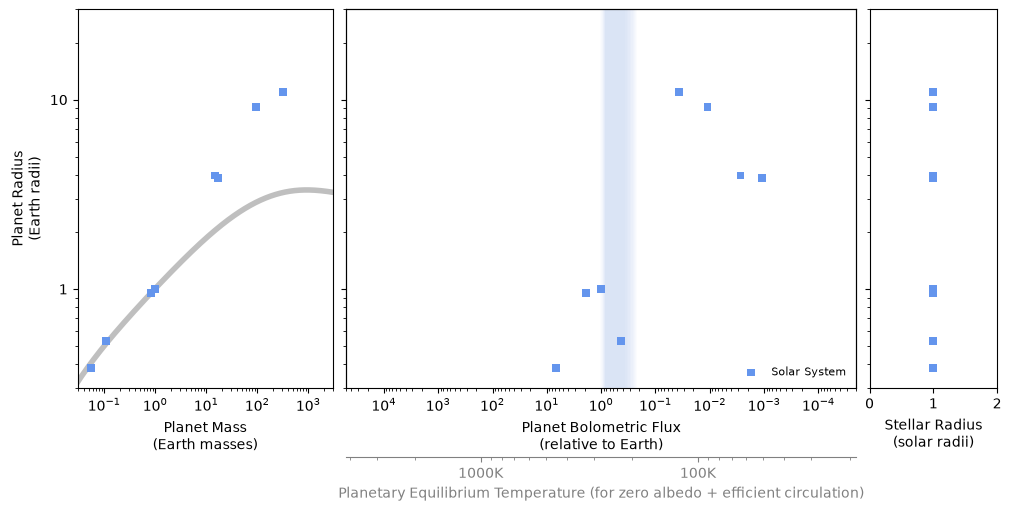
Likewise, we have predefined populations for the Solar System dwarf planets, smaller minor planets, and moons, with data downloaded from JPL Solar System Dynamics.
dwarfs = ea.SolarSystemDwarfPlanets()
dwarfs
✨ Solar System Dwarf Planets | 5 elements ✨minor = ea.SolarSystemMinorPlanets()
minor✨ Solar System Minor Planets | 10183 elements ✨moons = ea.SolarSystemMoons()
moons✨ Solar System Moons | 41 elements ✨Exoplanets
The NASA Exoplanet Archive maintains a list of confirmed transiting exoplanets. These are systems that have been published in the peer-reviewed literature. Most of them have been characterized in sufficient detail that they are unlikely to be false positives. This archive contains planets discovered through a variety of methods. We can access all exoplanets in the archive, regardless of discovery method, with:
exoplanets = ea.Exoplanets()
exoplanets
✨ Exoplanets | 6366 elements ✨For many purposes, it will be really handy to have just those exoplanets that transit their stars. To access those:
transiting = ea.TransitingExoplanets()
transiting
✨ Transiting Exoplanets | 4738 elements ✨vi.PlanetGallery().build([transiting, solar]);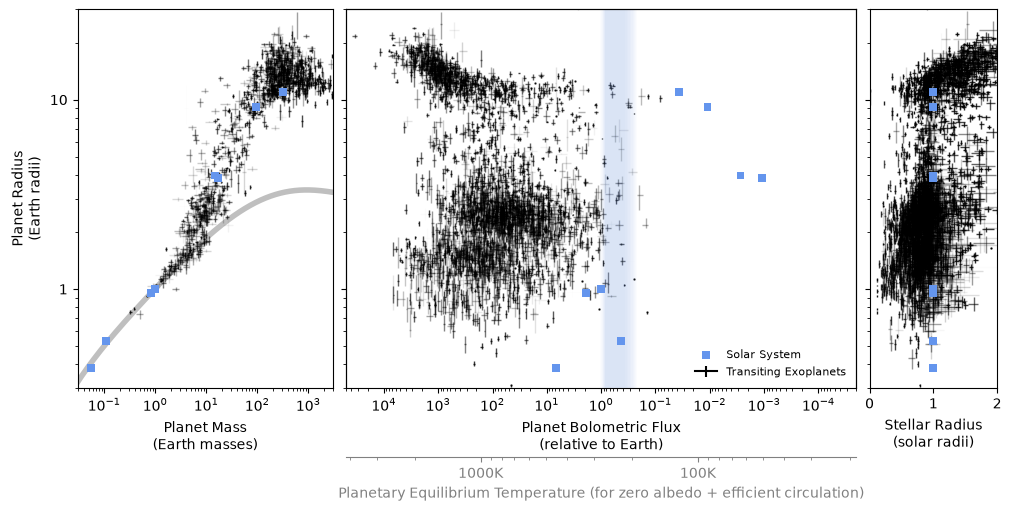
Exoplanet Subsets
Some common subsets have been defined as their own Population objects. To make your own subsets, see Populations for how to filter a sample of planets down according to its properties.
Which planets were discovered by the NASA Kepler mission or not?
kepler = ea.Kepler()
kepler
✨ Kepler | 3311 elements ✨nonkepler = ea.NonKepler()
nonkepler✨ Non-Kepler | 1427 elements ✨vi.PlanetGallery().build([kepler, nonkepler, solar]);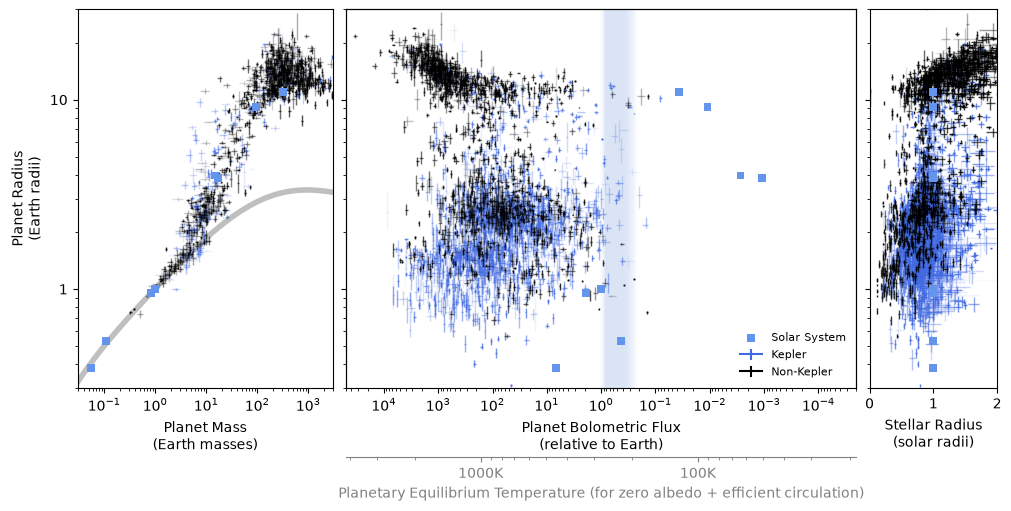
Which planets were discovered by the NASA TESS mission or not?
tess = ea.TESS()
tess
✨ TESS | 934 elements ✨nontess = ea.NonTESS()
nontess✨ NonTESS | 3804 elements ✨vi.PlanetGallery().build([nontess, tess, solar]);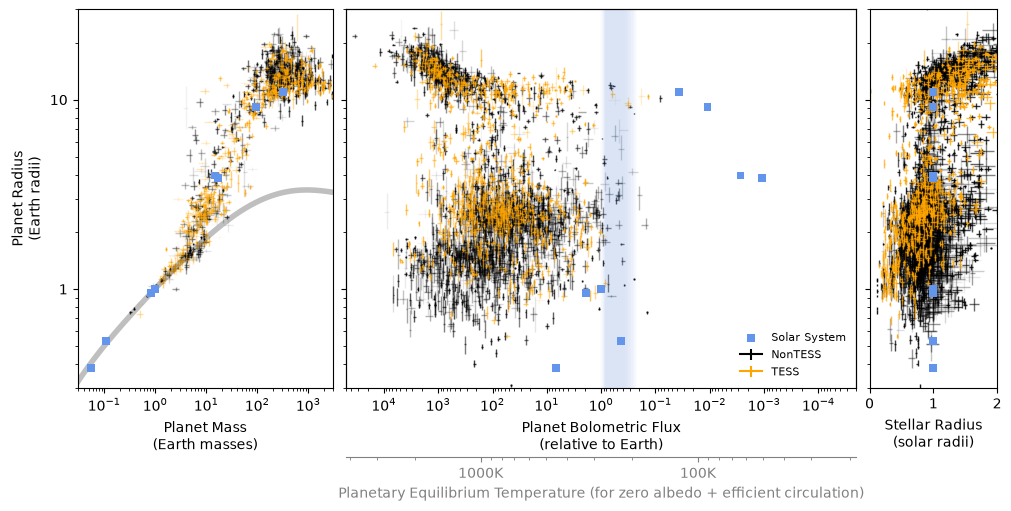
Which planets were discovered from telescopes in space or telescopes on the ground?
space = ea.Space()
space
✨ Space-based | 4281 elements ✨ground = ea.Ground()
ground✨ Ground-based | 457 elements ✨vi.PlanetGallery().build([space, ground, solar]);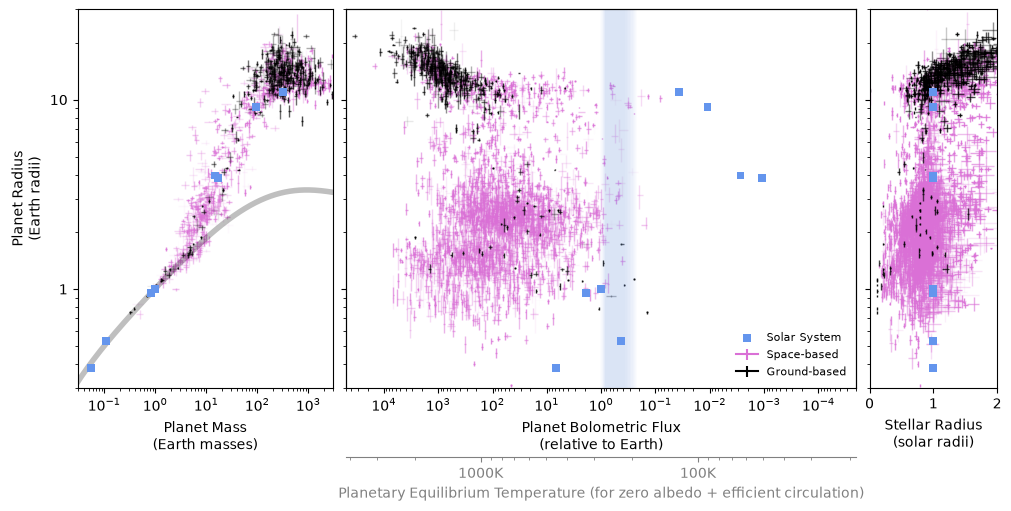
Which planets have masses that have been detected at better than ?
good = ea.GoodMass(sigma=5)
good
✨ Good Mass | 1009 elements ✨bad = ea.BadMass(sigma=5)
bad✨ Bad Mass | 3729 elements ✨vi.PlanetGallery().build([bad, good]);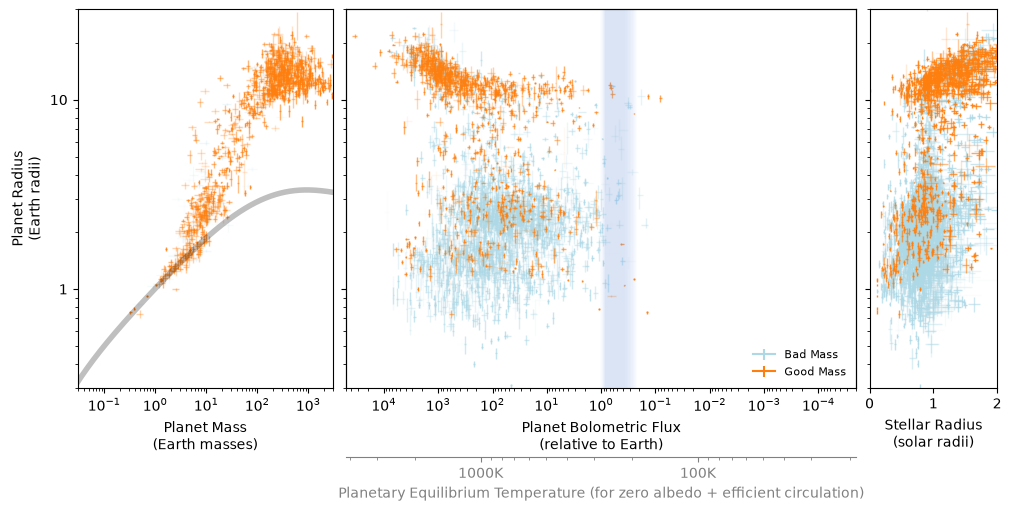
Collections
Because often we want to compare a few different population subsets, we include a few wrappers to generate dictionaries of populations grouped by discovery method, stellar spectral type, transiting or not, and/or type of Solar System object.
methods = ea.get_exoplanets_by_method()
methods
{'Astrometry': ✨ Astrometry | 6 elements ✨,
'Disk Kinematics': ✨ Disk Kinematics | 1 elements ✨,
'Eclipse Timing Variations': ✨ Eclipse Timing Variations | 17 elements ✨,
'Imaging': ✨ Imaging | 97 elements ✨,
'Microlensing': ✨ Microlensing | 289 elements ✨,
'Orbital Brightness Modulation': ✨ Orbital Brightness Modulation | 9 elements ✨,
'Pulsar Timing': ✨ Pulsar Timing | 8 elements ✨,
'Pulsation Timing Variations': ✨ Pulsation Timing Variations | 2 elements ✨,
'Radial Velocity': ✨ Radial Velocity | 1200 elements ✨,
'Transit': ✨ Transit | 4708 elements ✨,
'Transit Timing Variations': ✨ Transit Timing Variations | 29 elements ✨,
'Solar System': ✨ Solar System | 8 elements ✨}teffs = ea.get_exoplanets_by_teff()
teffs{'O': ✨ O | 2 elements ✨,
'B': ✨ B | 11 elements ✨,
'A': ✨ A | 31 elements ✨,
'F': ✨ F | 1204 elements ✨,
'G': ✨ G | 2230 elements ✨,
'K': ✨ K | 1703 elements ✨,
'M': ✨ M | 566 elements ✨,
'L': ✨ L | 1 elements ✨,
'T': ✨ T | 2 elements ✨,
'Y': ✨ Y | 1 elements ✨}transit_or_not = ea.get_transiting_and_nontransiting_exoplanets()
transit_or_not{'nontransit': ✨ Non-transiting Exoplanets | 1628 elements ✨,
'transit': ✨ Transiting Exoplanets | 4738 elements ✨}solar = ea.get_solar_system_objects()
solar{'major': ✨ Solar System | 8 elements ✨,
'dwarf': ✨ Solar System Dwarf Planets | 5 elements ✨,
'moons': ✨ Solar System Moons | 41 elements ✨,
'minor': ✨ Solar System Minor Planets | 10183 elements ✨}all = ea.get_all_planets()
all{'nontransit': ✨ Non-transiting Exoplanets | 1628 elements ✨,
'transit': ✨ Transiting Exoplanets | 4738 elements ✨,
'major': ✨ Solar System | 8 elements ✨,
'dwarf': ✨ Solar System Dwarf Planets | 5 elements ✨,
'moons': ✨ Solar System Moons | 41 elements ✨,
'minor': ✨ Solar System Minor Planets | 10183 elements ✨}All of these populations assume the values quoted in the archive are correct. If you need to update values, or choose values from different references, please see Curating. If you’re confident your population is good enough for your needs, you can skip along ahead!